Running Elastiscsearch as a Service on Windows
Windows users can configure Elasticsearch to run as a service to run in the background or start automatically at startup without any user interaction. Script service.bat” under “C:\elasticsearch-x.x.x\bin” folder which allows one to install, remove, manage or configure the service and potentially start and stop the service, all from the command-line.
c:\ELK\elasticsearch-x.x.x\bin>service.bat
Usage: service.bat install|remove|start|stop|manager
Script accepts one parameter followed by an optional one indicating the service id.
| Action | Comments |
| install | Install Elasticsearch as a service |
| remove | Remove the installed Elasticsearch service |
| start | Start the Elasticsearch service |
| stop | Stop the Elasticsearch service |
| manage | Start a GUI for managing the installed service |
Installing the service
C:\ELK\elasticsearch-x.x.x\bin>service.bat install Installing service : "elasticsearch-service-x64" Using JAVA_HOME (64-bit): "C:\Java\jdk1.7.0_72" The service 'elasticsearch-service-x64' has been installed.

Using manager with service.bat
C:\ELK\elasticsearch-x.x.x\bin>service.bat manager
Succesfully started service manager for 'elasticsearch-service-x64'.
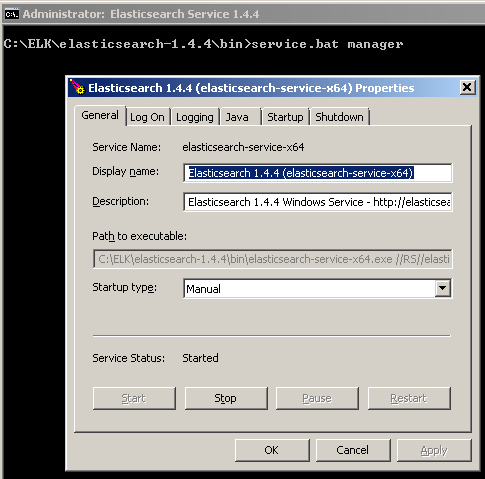
Similarly start and stop with service.bat will start or stop Elasticsearch.
Menu to Food Tour: 5 AI Agents That Turn Any Restaurant Menu Into a Culinary Adventure
What if you could point your phone at a restaurant menu in…CCAT Chapter 1: Introduction to Claude Code Agent Teams
Learning Objectives By the end of this chapter, you will: What is…Orchestrating Claude Code Agent Teams CCAT
Learn AI Using AI [LAUA] This comprehensive educational guide details the functionality…Connect kubernetes pod to a GCS bucket using JS
To connect from a Kubernetes pod to a Google Cloud Storage (GCS)…